
Additional equipment
| Equipment added for better flying | |
|---|---|

| |
| TSU et Pacha35 | |
| Pays |  France France
|
| Région |  Bretagne Bretagne
|
| Département |  Ille-et-Vilaine Ille-et-Vilaine
|
| Objet | IInformation on hardware products that improve simulation |
| Références | |
| Site web | Simvol |
| Contact | Click here |

This page will provide the most complete descriptions possible of hardware added to the PC for flight simulation, such as:
- joysticks, rudder pedals, and throttles for airplanes and helicopters,
- hardware replicating the sets of buttons and indicator lights found on instrument panels.
Initially, the hardware presented is that of the Simvol administrators, to which members may add descriptions.
Version française : cliquez ici.
Helicopter simulation equipment
TSU Helicopter-Specific Controls

It's reasonable to assume that the smaller audience for this type of piloting (quite different from that of fixed-wing aircraft) doesn't encourage traditional manufacturers to offer reliable and affordable equipment.
If you try adapting your airplane controls for helicopter flight, you quickly realize that they aren't really designed for it, that the solution found can only be temporary, and that the whole system suffers from a severe lack of responsiveness and precision—exactly what piloting a rotary-wing aircraft requires.
With the release of MSFS2024, which offers a career mode for both airplanes and helicopters, perhaps more people will try their hand at this delicate type of piloting.
While the frustration of the difficulty of piloting with traditional controls can be overcome with a little perseverance, the amateur who wants to improve will quickly need to, if they are sufficiently handy, either significantly adapt their equipment ( this example made using PVC pipes), or seek to acquire a more or less complete set, ranging from the almost indispensable purchase of just the collective control stick while keeping their joystick and rudder pedals, to the purchase of a complete set including collective and cyclic control sticks and rudder pedals.
In the case of a helicopter set, the use of rudder pedals is not secondary, and the need to have them should not be overlooked. In helicopter flight, rudder pedals are essential because almost every action on either of the other two main controls requires a counter-action on the rudder pedals. To see for yourself, try rotating in place without using your rudder pedals…
A quick web search for suppliers of such systems will quickly dampen the ambitions of our amateur pilot, as the price can seem… surreal and astronomical.
Examples include the following models (keeping in mind that all models outside the Schengen Area are also subject to import taxes, further increasing the cost):
* Apache Simulator 🇮🇹 (sets from this supplier can still be considered "affordable" compared to the following)
* SimFab 🇺🇸
The 3D-AFI Helicopter Control Unit
These controllers are used by the authors of this article (TSU and Pacha35).
Then there are the units offered by 3D●AFI on etsy.com (note: the shop only lists items for sale when they are actually in stock, so delivery is guaranteed if the item is available).
These are the most affordable units we could find, and, to top it all off, the quality is excellent.
You can purchase the single collective throttle control, which you will need to mount yourself on the side of your seat. Note that the description indicates this collective throttle control has a rotary throttle, which is not present on the model included with the complete set.

Two of us at simvol.org purchased the complete set, which includes the classic trio of controls.
Once you place your order and pay Donovan (the creator based in the Netherlands behind the name 3D●AFI), he will quickly send you the tracking number so you can see its location. It will arrive at your door in just a few days after shipment (less than a week from payment to delivery).
It comes in a large box, and the magic begins as soon as you unpack it. Each item is carefully packaged and protected with plenty of bubble wrap and foam.


The entire unit is constructed from aluminum and 3D printed (PLA). Final assembly is quick after reviewing the instructions, and the whole thing will be operational in just a few dozen minutes. The quality is exceptional, and the design is remarkable. This is truly professional equipment.
Please note that with your order, you will also receive all the necessary tools for assembly (1 open-end wrench, 1 Allen wrench), the various connection cables for the control axes, as well as some spare parts (mounting screws) and a sheet of protective pads to stick under the set to protect your floor.

Since the cables are oversized, you will need to secure them to the frame using plastic cable ties (Rilsan type, included as well) to prevent them from accidentally snagging.

Once the set is assembled, it connects to the computer via a single USB plug (at the end of a generous 2m cable), and the entire system is instantly recognized as a game controller under the (rather unexciting) name "Arduino Leonardo" (change in progress by the conceptor).
Before using it for the first time, you will need to perform the standard calibration of the system (via the Game Controllers panel).


The Y-axis corresponds to the rudder pedal travel.
The Z-axis corresponds to the collective pitch travel.
The X/Y axis square corresponds to the cyclic stick.
The 12 buttons are assigned to the two switches and the collective pitch button on one hand, and to the cyclic button, trigger, and hat switch on the other.
For practical use, you will need to assign the controls to the appropriate locations in your various simulators. FS2020 :

FS2024 : example of axis settings (some are provided by 3D-AFI).
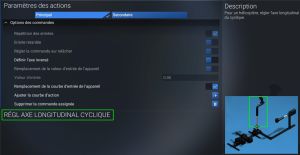
Cyclic, longitudinal axis parameters
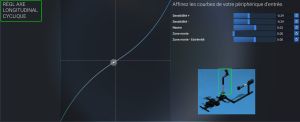
Cyclic, curved longitudinal axis
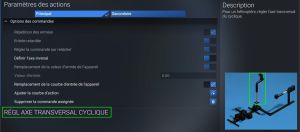
Cyclic, transverse axis parameters
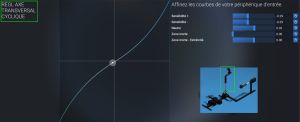
Cyclic, curved transverse axis


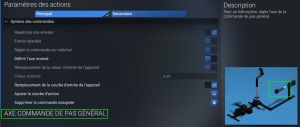
Collective parameters
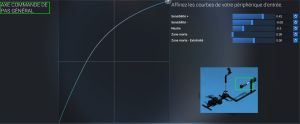
collective curve
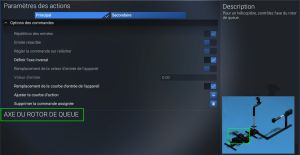
Tail rotor axis parameters
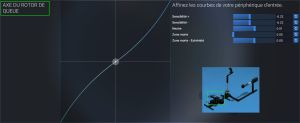
curved tail rotor shaft


Once everything is set up and the buttons are assigned (trim, views, or other functions, as you prefer), the immersion is almost total. Piloting becomes easier (after a little practice), and satisfaction is guaranteed.
As a side note, in a previous life, I was a professional helicopter pilot (military). My last flight was in January 2001. Since then, I haven't flown a helicopter, as my career has shifted towards fixed-wing aircraft. I instantly rediscovered the lost sensations during my first virtual flight with this set.
If you're tempted by this adventure, I wholeheartedly recommend buying this set.
And to be perfectly clear, neither I nor anyone at Simvol are affiliated with 3D●AFI in any way, but when a product is worthwhile, you shouldn't hesitate to share your experience.
Finally, if you ever decide to take the plunge, also keep in mind that a helicopter control system... takes up a lot of space (133x48 for the 3D-AFI model) and you will probably also have to change or adapt your seat!

"Pacha35's update: I had given up flying helicopters with airplane-style joysticks. On TSU's advice, I acquired 3D-AFI joysticks and it's finally a real treat. In FS2024, I've already achieved "S" ratings in career flights with the H125!"